Showing posts with label API. Show all posts

Thursday, May 13, 2021

WHEN TO USE SAAS DATA BACKUP VS REPLICATION


As SaaS data management solutions evolve to meet the market's growing data management and data endpoint needs, the lines are becoming blurred between SaaS backup and replication. The following summarizes the typical SaaS backup and replication features that you are likely to encounter on the market and where these lines become blurred.

Some of the reasons for the market's evolving needs include the movement towards digitizing businesses, reflected in the increases of SaaS and cloud adoption, along with increasingly ambitious business continuity goals and more demanding regulations. Some key data goals may include:

  • Optimizing DataOps and DevOps time and resources

  • Creating a unified view of the companies data and customers

  • Seeding data lakes and warehouses for analysis

  • Meeting privacy regulations

  • Meeting financial regulations

  • Meeting business continuity RTO and RPO goals

  • Project-specific goals such as migrations and enhancing systems

[Download our Salesforce data backup and replication comparison]

SaaS Backup Solutions: What to Expect

SaaS backup solutions provide DataOps with a tool that will automate their backups and make it easy for them to recover their data, metadata, and other assets such as files. A non-technical user should be reasonably comfortable navigating the solution. The main goals of the backup app are to meet compliance, audit, and business continuity goals. The data's endpoints are usually limited to a public or private cloud, necessitating a replication solution should the company need an on-premise self-hosted solution. What you will typically find as features:

  • Scheduled/automated daily backups of data, metadata, and other assets such as files

  • Reporting to indicate changes between backups

  • Comparison tools to investigate changes

  • An audit trail to validate compliance

  • "Forget Me" tools to meet privacy regulations

  • The ability to easily and quickly recover data from the backups to meet your RTO goals


When the Lines Blur Between SaaS Data Backup and Replication


The lines become blurred between commercially available products (backup and replication) when the demand for the frequency of backups increases, additional data endpoints are needed or data use becomes more diverse. Unfortunately, this sometimes requires a bit of digging and doesn't always yield a perfect vendor-to-vendor comparison which may include charges for additional data storage and API calls. The following section will highlight the typical replication features available commercially.

[Download Our Salesforce data backup and replication comparison]

SaaS Replication Solutions: What to Expect

As your data usage or endpoints needed become more complex, the products you will find more useful become SaaS data replication solutions.

When you want to do more with your data than back it up, then you will be drawn to SaaS data replication solutions. These may be additional features from SaaS data backup providers or a unique product line from a SaaS data management company. The solution helps to get the right data to the right business unit, regardless of geography, reliably and consistently. What does that mean?

Similar to backups, replicating SaaS data can ensure that, if one system fails, data can easily be recovered from another location. With data replication, it can also reduce your RTO since the data can be replicated to a local server. Replication can certainly boost your ability to meet business continuity goals and regulatory mandates, but, because of those additional endpoints and automated schema updates, it can do much more. SaaS data replication solution can power a companies analysis by populating data lakes and warehouses on a frequency of your choosing. It also finds application in enhancing or testing system performance to help with IT decision-making. These are some of the typical feature you can expect to find.

  • Flexible frequency and scheduling 

  • Multiple endpoints (SQL, NoSQL, public cloud, private cloud and on-premise)

  • Sandbox replication

  • Automated schema updates 

  • Choice of run modes

  • Enhancements through additional APIs

  • Integration with data workflows (connectors) 


Discover which set of data management tools work best for you and your company. Download Our Salesforce data backup and replication solutions comparison.


Monday, October 21, 2019

How Business Automation Is Shaping Digital Transformation for Retail Industry


Business automation is usually a function of how fast a company is growing or maturing. Customers are moving from old desktop/server apps with limited connectivity into more modern apps with APIs enabled.

Now it’s more a “must have” rather than “nice to have.” APIs are built for improving automation and user experience, and it’s already happening. To give an example, Salesforce gets more API transactional traffic than from Browser or mobile UI.

Manual updating is at its peril: Scale-up
Manual updating and reconciling between systems will not sustain long-term growth. Think Facebook – if they had to approve or set up each person joining Facebook, where would they be? You get the point. If businesses want to move fast, they need to get manual steps out of the process.
Scaling up is the best way to compete.  It requires focusing the team’s efforts on growth, not maintaining current operations.  Also, the more there are links in the chain, the more it is prone to break, and this is even truer when humans are involved.
Businesses must take their team and let them spend that time creatively, figuring out how to take the company to the next level.  

A market tendency towards SaaS or Cloud-based applications
Software implementation helps to improve processes, not merely map current processes into the new software. It takes a little more time but is worth it.  We do see trends that clients who focus on getting the processes in place scale much faster.

The growth of Cloud is undoubtedly tremendous.
The tendency towards cloud-based applications came mostly from the years of heartache caused by on-site servers.

We also see the growth of eCommerce as integral. Earlier, warehouse data was used for internal purposes only. But now when a scan happens, that data is automatically reflected publicly to the whole world.
Software as a Service has inherently built-in demand for increasingly complex integration. If you have two SaaS apps, you have two integration points. If you have three SaaS apps, you have six integration points.

Evolution of Business Automation
Automation is evolving.
First, it was getting an application to expose APIs, then came orchestration of business processes.
The third phase would be intelligent automation, where business processes learn and adapt over some time. Much work has been done, and there is a lot to be done.
To improve process automation, it takes planning, implementation, and usually a bit of back and forth.  As technologies evolve, time to execute process automation tends to decrease and will continue to do so.  
Let’s compare an EDI setup to API integration.  API integration takes a fraction of the time, breaks less often, and is much faster to fix. It will continue to improve and speed up.  It only means that the time and cost to execute will become trivial.
All of our time and efforts can be spent on the planning stage, substantially increasing and speeding up our iterations, therefore speeding up our improvements, growth, and success.

Industry trends towards Business Automation
Two of the most talked about trends are – Artificial Intelligence (AI) and Blockchain.
While Blockchain is still trying to find a foothold and would take some time, AI is getting embedded in all parts of our lives, many of what we don’t even notice.
Businesses should start actively looking at AI on all aspects of what they do, including business process automation and often reducing manual labor. In a recent article, it was mentioned that there is a shortage of candidates, and many jobs are going unfilled.
With current immigration policies, it is to get worse, and this is where we feel businesses need to start thinking about removing manual work.
Digital integration and AI to play an active role in most software we build.
In the retail industry, retailers are moving towards private labels versus reselling models.
This is happening as the MAP becomes more prevalent, and brands themselves are going direct.  
With this, we see a lot of blurring of the traditional supply chain lines and an increase in 3PL as retailers compete with Amazon’s standards.
As the supply chain consolidates, EDI will die out. We can have fast, easy, stable, and inexpensive integrations that achieve standards with APIs instead.

Best Practices for organizations to implement Business Automation

Disciplined approach with Data: Flourish or perish
Focusing on business automation will enable organizations to compete in the digital age.  Companies that start down this path now are the ones that will survive over the next 5-10 years, but also are the ones who will thrive.
One of the things we notice with our most successful clients is that they pay attention to the data and use it to gain critical insights.
Companies beat out their competition over time with data insights. Getting the ideas and having the systems to execute them with pig-headed discipline is the key.

Transform error-prone manual approach into automation
Companies should look at each of their processes and manual touchpoints. Then to figure out which touchpoints are causing the most pain or error.
They can use Six Sigma or other methods to identify errors within business processes.
Take the one that is most impactful and automate it and then move to the next. I don’t mind going slow as long as organizations are tackling those process hiccups first that cause the most pain.

Why businesses need to work towards Digital Transformation and Integration
Businesses that are thinking digital today are the ones going to succeed in the future.
Many traditional retailers have already started their digital transformation, and this is just the tip of the iceberg.
It is an absolute necessity to have their systems work together seamlessly along with their suppliers’ and clients’ system. Not to mention capturing the data and getting the insights are also needed to decimate the competition.
There are two camps of thought.
Purchase an all-inclusive package to run your business end to end
Or,
Get the best of breed application.
While most “all inclusive” ERP packages are well integrated, companies have started to look for the best of the breed.
With this type of integration, they can maximize productivity for their businesses and minimize risks with vendor lock-in.
For example, Salesforce is mostly chosen for CRM,  even if the businesses have SAP, Oracle, or Microsoft. When organizations are looking at such business architectures, they need to be digitally integrated and provide their end customers a seamlessly integrated experience.

How automation has changed the way of work
Our client’s focus shift from maintaining the business to working on growing the business. When you have your systems and processes set up, then you have the framework or scaleup.  As you scale up, your systems can hopefully adapt to the change, but you will need to either update processes within your system as you grow or upgrade to ones that can scale with you.
It’s like hiring. Hire for the size you are now and will realistically be soon, but you always want some room for growth. The lucky part is that the right systems could take you through more business phases than a person usually can.   

Conclusion
From a software vendor standpoint, our goal is to “delight” our customers.
Our vision focuses around improving visibility and efficiencies in the supply chain. There are still lots of inefficiencies that we see in day-to-day activities that we will be working hard to eliminate.  Companies that take the customer feedback loop to heart will partner with similar companies, and these alliances will improve the experience of end consumers exponentially.
All-in-one software systems will struggle as best of breed becomes the norm again.  Throughout the past, the software has seen a few cycles from the best of a kind to the all-in-one.
Today, the ease of system integrations matched with stability dominates. We will see all-in-one systems that are hard to use, expensive, and impossible to set up, slowly die off even for large enterprises.


Wednesday, February 20, 2019

Describing Enterprise Artificial Intelligence: Platform as a Service With Current AI Infrastructure


If I will talk about the Enterprise AI, then it is hard to think of an application that doesn’t use a database. If you see from mobile to web to the desktop, every modern application relies on some of a database. Some apps use flat files while others rely on memory or NoSQL database.

If I will talk about the traditional enterprise applications, then they interact with large database clusters running Microsoft SQL, Oracle etc. The fact is that every application needs it.

Like databases, Artificial Intelligence (AI) is moving towards becoming a core component of modern applications. In the coming months, almost every application that we use will depend on some form of AI.

Enterprise AI simulates the cognitive functions of the human mind — learning, reasoning, perception, planning, problem solving and self-correction — with computer systems. Enterprise AI is part of a range of business applications, such as expert systems, speech recognition and image recognition.

Figure 1


1. Start Consuming Artificial Intelligence APIs

This approach is the least disruptive way of getting started with AI. Many existing applications can turn intelligent through the integration with language understanding, image pattern recognition, text to speech, speech to text, natural language processing, and video search API.

Let’s look at a concrete example of analysing the customer sentiment in a customer product requirement demo session. Almost all the Customer calls to the service team are recorded for random sampling.

A supervisor routinely listens to the calls to assess the quality and the overall satisfaction level of customers. But this analysis is done only on a small subset of all the calls received by the customers to the service team. This use case is an excellent candidate for AI APIs. Each recorded call can be first converted into text, which is then sent to a sentiment analysis API, which will ultimately return a score that directly represents the customer satisfaction level.

The best thing is that the process only takes a few seconds for analysing each call, which means that the supervisor now has visibility into the quality of all the calls in near real-time. This approach enables the company to quickly escalate incidents to tackle unhappy customers and rude customer service agents.From CRM to finance to manufacturing domains, customers will tremendously benefit from the integration of AI. There are multiple AI platforms and API providers like (With link):


2. Build and Deploy custom AI models in the Cloud

While consuming APIs is a great start for AI, it is often limiting for enterprises.

We have seen the benefits of Integrating Artificial Intelligence with applications, customers will be ready to take it to the next level.

This step includes acquiring data from a variety of existing sources and implementing a custom machine learning model. It requires creating data processing pipelines, identifying the right algorithms, training and testing machine learning models and finally deploying them in production.

Similar to Platform as a Service that takes the code and scales it in the production environment, Machine learning as a service offerings take the data and expose the final model as an API endpoint. The benefit of this deployment pattern lies in making use of the cloud infrastructure for training and testing the models. Customers will be able to spin up infrastructure powered by advanced hardware configuration based on GPUs and FPGAs.

Platforms that offers Machine Learning as a Service:

3. Run Open Source AI Platforms On-Premises

The final step in AI-enabling applications is to invest in the infrastructure and teams required to generate and run the models locally. This is for enterprise applications with a high degree of customization and for those customers who need to comply with policies related to data confidentiality.

If ML as a Service (MLaaS) is similar to PaaS, and running AI infrastructure locally then it is comparable to a Private Cloud. Customers need to invest in modern hardware based on SSDs and GPUs designed for parallel processing of data. They also need expert data scientists who can build highly customized models based on open source frameworks. The biggest advantage of this approach is that everything runs in-house. From data acquisition to real-time analytics, the entire pipeline stays close to the applications. But the flipside is in the OPEX and the need for experienced data scientists.

Customers implementing the AI infrastructure use one of the below open source platforms for Machine Learning and Deep Learning:

If you want to get started with AI, explore the APIs first before moving to the next step. For developers, the hosted MLaaS offerings may be a good start.Artificial Intelligence is evolving to become a core building block of contemporary applications. AI is all set to become as common as databases. It’s time for organizations to create the roadmap for building intelligent applications.

AI Data evolutions like Data Processing and Neural Networks.

Now in present time we are feeding loads of data to the computer, so the computer will learn about Deep learning technologies and the reason for behind this to take AI Initiative.

Neural networks process information in a similar way the human brain does. The network is composed of a large number of highly interconnected processing elements (neurons) working in parallel to solve a specific problem. Neural networks learn by example to solve complex signal processing and pattern recognition problems, including speech-to-text transcription, handwriting recognition and facial recognition.

Data processing is, generally, “the collection and manipulation of items of data to produce meaningful information.” In this sense it can be considered a subset of information processing, “the change (processing) of information in any manner detectable by an observer.”

AI data processing is the need for high-quality data. While data quality has always been important, it’s arguably more vital than ever with AI initiatives.

In 2017, research firm Gartner described a few of the myths related to AI. One is that AI is a single entity that companies can buy. In reality, it’s a collection of technologies used in applications, systems and solutions to add specific functional capabilities, and it requires a robust AI infrastructure.

Another myth is that every organization needs an AI strategy or a chief AI officer. The fact is, although enterprise AI technologies will become pervasive and increase in capabilities in the near future, companies should focus on business results that these technologies can enhance.

Conclusion

In, the Conclusion I would say everyone has to use the Artificial Intelligence Applications and as we found that many existing applications can turn intelligent through the integration with language understanding, image pattern recognition, text to speech, speech to text, NLP and video search API.

As we have seen earlier a supervisor can do the Random Sampling at the time of Customer Product Requirement demo session. So, what supervisor wants to listen in the last about the customer satisfaction and how better we can use the AI APIs to convert the call into text for the sentiment analysis. As, I have mentioned above in this use case we can definitely find out the score directly what is the satisfaction level of customer.

So, with the help of AI APIs we can easily understand the customer problems and give a better product to them for their use.

As, I have mentioned above for the same that we have to build and deploy the custom AI models in the cloud and why it is more useful and beneficial for the customers.

So, if I will define why is it more useful and beneficial as we have seen above the AI APIs will take to the customer to the next level. AI APIs will acquires data from variety of sources and help in to create data processing pipelines and identifying the right algorithm and deploy in production environment.

So, in the last I would say use the AI APIs applications to reduce the pain of customer and help them to reduce the complexity and make the process more effective with the help of AI APIs.

Monday, August 6, 2018

Swagger examined (part 3) How to create a connector to your app using DBSync


— Before proceeding I’d suggest you read Part 1 and Part 2 of this article. —

In this age of integration, you need an edge. The DBSync Swagger API connector is it. If you have a Swagger compliant JSON description of your app’s RESTful API, you can use this tool to create a connector to your app, which can then serve as a bus to connect to other apps, such as Salesforce or Quickbooks, via the DBSync app.

In this tutorial you will learn how to create this kind of connector, enabling you to up your success at creating a meaningful and efficient ecosystem for your business.

Creating a Swagger API connector

Creating a Swagger API connector is simple. You just need to follow these two easy steps:

Step 1: Create a new project.

This step is required only if you don’t already have a project where you want to add the connector. In order to do so, just go to the DBSync app’s menu on the left side, and click on the Projects item. The below figure shows the results screen. Now, click on the Create New Project button, enter the name of your project and press the Save button. Your project will appear on the project’s list on the screen.


Figure 1 – Create a new project

Step 2: Create a new Swagger API connector

Once you have your project ready, select it and go to the main menu item Connectors. Once there, click on the Create New Connector button. You will see a screen asking for a name and connector type. Type in the name of your connector, and select Swagger API Connector from the dropdown menu. Then, click on the Save button. A new screen asking for the connector’s information will appear.


Figure 2 – Connectors’ item in main menu


Figure 3 – Create a new connector


 The, in the next screen (figure 4) enter the following parameters: 
  • 1.      The username and password of your account in your app.
  • 2.      Authentication type: select from the dropdown menu, among the following values:

a.      NoAuth: when no authorization is required.
b.      BasicAuth: when you are using a basic access authentication.
c.      OAuth 2.0: when you need to use the OAuth protocol.
d.      ApiCodeAuth: when the authorization mechanism is defined in your code.
  • 3.      The URL to your RESTful API.
  • 4.      Copy and paste the JSON file that documents your API.


Figure 4 – Connector’s parameters

Once all the required inputs are completed, click on the Save button. You will then see the following screen:


Figure 5 – Connector successfully saved

That is it! Your connector is ready to do the work for you.

You can test the connection by pressing the Validate Connection button, just to be sure that all is working correctly.

Final Words

In these series of three articles on Swagger you have seen the importance of Swagger as a standard for creating APIs. You have also learnt how to create a JSON file that documents your app’s RESTful service. And finally, in this third part, you have understood how to create a Swagger API connector by using DBSync.

Ready to learn more? Check out our website and start your free trial now!

Saturday, August 4, 2018

Swagger examined (part 2): The DBSync’s Swagger API


— If you haven’t already read Part 1 of this article, I strongly recommend you to do it first. —

Have you ever run into difficulty when connecting RESTful services? You are not alone. Many junior developers, as well as seasoned professionals have struggled with this problem. The great news is that the unique challenges posed by these developments, can be lessened with the use of Swagger.

This article continues the previous one with a deeper description of this open source framework, which is a must choice for serious API (Application Programming Interface) developers. Then, it moves on to explaining the basic reasons why you should use it, and how it is employed by DBSync to help you create connectors to apps of your choice, in an easy-to-follow manner. At the end, it includes a link to the next article of this series that explains you how to create customized connectors for your apps.

What is Swagger

Swagger is an open source framework consisting of standards and tools, which help you to design, build, document and consume RESTful web services.

Started as a project by Tony Tam in 2011, it grew in size and importance. At present it is sponsored by SmartBear Software, and it has been eagerly accepted by the market.

Why use Swagger

Reason 1: Add value to your products by creating an ecosystem based on common knowledge

Swagger consists of a set of rules and tools for describing APIs. Its rules standardize practices in areas such as parameter definition, path, responses and more. These tools are language agnostic, meaning that you can choose the programming language you prefer.

Having a common way helps create a system that can be easily connected to others, and that can be updated and modified without difficulty by many developers.

An example is Netflix, which is based on a microservice architecture that provided an innovative and efficient way of delivering a service at scale and in real time. As a result, the company rose to become a market leader.

Reason 2: Gain efficiency through better communication

We all know how difficult it is to translate a business idea into a programming success. One of the main challenges is communication: business, analysts, product managers and users find it difficult to understand the techies’ language.

Swagger is great in this regard, as one of its characteristics is that it is easily comprehensible for developers and non-developers alike, creating a great communication channel.

Thus, for example, product managers, analysts and even users can easily give input about the design, and developers can then translate these ideas into software.

This communication is possible not only during development, but also during testing and documentation, helping create a system that is complete, easy-to-understand and customer oriented.

Reason 3: Use a widely proven tool

Yelp is a company that handles reviews and bookings for businesses. When a company like Yelp, which deals with thousands of people making reviews relies on Swagger, you can be assured that the effectiveness of the framework has been properly proven.

With many important players – such as Netflix, Akana and Yelp – relying on Swagger for their API developments, you should have no doubt about using it.

In addition Swagger has the support of several big companies, such as Microsoft, IBM and Google, through the Open API Initiative.

Reason 4:  Develop with an open source framework

By being open source, Swagger carries many of the benefits of crowd based development, such as cost savings, flexibility, and accountability.

Open source communities have a strong value sense, which results in responsible and efficient products. In addition, many volunteers test its usage, creating a safe option. Besides, you can also be a contributor and join the ranks with giants such as Microsoft and Google by supporting Swagger’s development.

Thus, whether you are a big player with a fat budget or not, you can always benefit by choosing Swagger.

How DBSync uses Swagger
DBSync Cloud uses the main advantages of Swagger to let you create the connector you need. The only thing that you actually need is a JSON file with all the information describing your app’s API.


Figure 1 – Creating a connector
Once you have your JSON file, DBSync helps you create a connector to your app that you can use to create data transfers to other apps, such as Salesforce, Quickbooks and many more. You can even create your customized connector to any two apps, and later on connect them both via DBSync. Once you have the two apps mapped to each other, your data transfer is straightforward.


Figure 2 – Integrating applications

Thus, you can design and build an integrated ecosystem that best fulfills the needs of your business. The possibilities are almost unlimited.

Conclusion

APIs are not new, and at present, they are increasingly used to integrate apps. Basically, when you create a Swagger compliant API, you are allowing others to make use of your app. This translates into more business opportunities, more customers and better profits. Swagger, is the right technology to achieve this.

In Part 3 of this article, we will learn how to create a connector to your app with DBSync, by using your API’s JSON.

Find this exciting? Go to our website and try any of our products for free. If you have any queries, contact us, and we will contact you as soon as possible.

Friday, August 3, 2018

Swagger examined (part 1) How to document an API with incredible simplicity


Do you know what Swagger’s main characteristic is? It is its incredible simplicity: its capacity to easily and utterly describe how an API works, where it resides, what inputs it needs, and what results it produces.

It is this simplicity that helped Swagger make itself one of the most successful developmental tools available on the market.

It is the same need for efficiency that makes Swagger compliant REST services so invaluable when a new API is created.

In this article you will learn the basics on how to create a Swagger RESTful documentation based on another popular technology known as JSON.

So let’s start by learning about a great tool: the Swagger Editor

Using Swagger
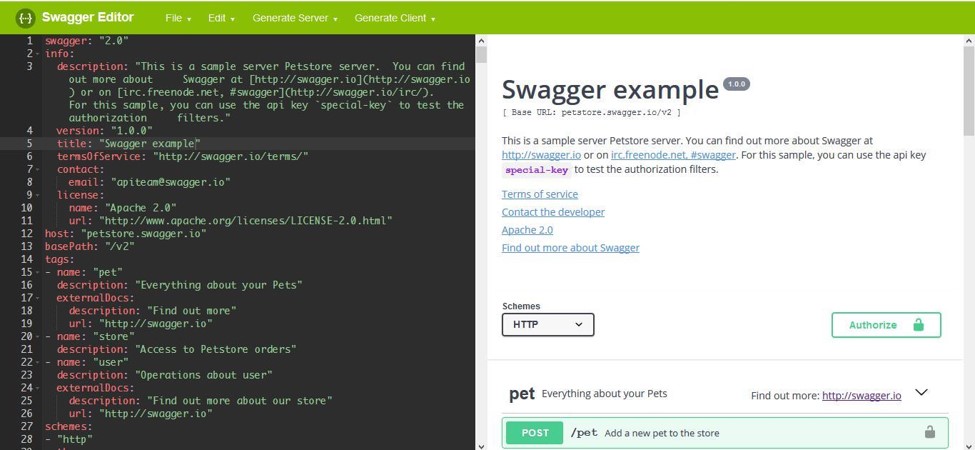
There are several editing tools that can help you to create Swagger compliant APIs. One of them is the Swagger Editor, which you can use to create your API documentation. It is an open source tool that you can download or use it online.


Figure 1 – Swagger Editor

Learning JSON

If you are looking for a good reference on JSON, you can consult the standard available here. Alternatively, you can also read the RFC 7159 that is available here. Both of them present a complete description of JSON, but they are very technical.

Alternatively, if you need a rookie’s site that will teach you JSON from scratch, you can go to W3SCHOOLS.

Document description

The Swagger standard defines the structure of the JSON file that describes a RESTful web service.
Here below is a simplified description of the main sections.

Document sections

The main sections that you need to understand are: the API declaration, the paths and the definitions.

API declaration

The API declaration section describes the main aspects of an API, such as its title, version, where it is hosted, the schemes that it uses, and the MIME types it consumes and produces.
The required parts are:

  • 1.      Swagger version:  specifies the Swagger Specification version being used.
  • 2.      basePath: the root URL serving theAPI.
  • 3.      The apis or paths section: a list of the APIs exposed on this resource. There must be no more than one APIS object per path.

The consumes and produces sections list the MIME types the resource consumes and produces.
Additional information shown in the figure below, which is optional, includes the license, the host and the x-parameters. The x-parameters, such as x-response-strategy, are pairs of keys and values defined by you.


Figure 2 – API declaration

MIME types
The MIME types that can be consumed or produced are summarized in the table below. In our example we use a JSON type, but XML and XHTML are also other possible options.


Table 1 – MIME types

Paths
The path describes the different operations. The required parameters are:
  • 1.      The method required to invoke the operation. The possible values are:  GET, POST, HEAD, PUT, PATCH, DELETE, OPTIONS and TRACE.
  • 2.      Parameters: are the inputs to the operation. Each parameter must include its name and type. Other characteristics are optional.

Additional parameters shown in the below figure, which are optional, are:
  • 1.      Produces: a list of MIME types produced. In this case JSON type.
  • 2.      Responses: a description of the responses available in this operation.
  • 3.      Path parameters: between curly brackets, they must be provided by the API call.


Figure 2: paths

Definitions
The definitions or data models section contains a list of data objects. Each data object can have several parameters.
The required parameters are:
  • 1.      Name: the name of the data object.
  • 2.      Properties: the fields that define the data object. Each property has a name and a type.


Figure 3 – definitions

Where to find more information
The best reference is the official Swagger page, which is available here.

Conclusion
The Swagger standard provides a great tool to document APIs. In this article you have learnt the main components of this documentation, namely API declaration, paths and definitions or data models.
In the next article of this series you will read about the general characteristics of Swagger, its core benefits and how DBSync uses it for your businesses.
If you want to learn more about this wonderful technology, consult the Swagger page. Even more, if you want to learn how we have applied Swagger to apps integration, visit our page.

Wednesday, July 18, 2018

Discover real time integration with DBSync’s salesforce streaming connector


Have you ever felt the power of speed? That is exactly what one new Salesforce Streaming Connector brings you: real time, made real.
The connector is based on Salesforce Streaming API, which makes use of a technology that transmits data in a practically continuous manner, without waiting for the whole data set to arrive, enabling you to manipulate the data almost immediately after arrival.
Moreover, the Salesforce Streaming API helps you to focus your data transfer on the relevant data only, as it follows a publisher-subscriber model. In it, users subscribe to channels that broadcast specific data changes defined via SOQL queries. Thus, for example, a channel can be designed to inform changes in email addresses available on clients’ accounts.

What are the Benefits

An architecture with a focused real-time processing can have a huge impact on how your business functions, because you have knowledge as transactions take place.
With continuous data processing, a small amount of transactions is processed every time, making the data available as it arrives.
Figure 1
The benefits are plenty: data access is boosted, the necessary resources are reduced, and uptime is improved. These advantages can have an enormous effect on your business, by helping you outperform your competitors and increase your profits.

When to Use Real Time Integration

Continuous data processing can have a serious impact on several areas of your business. Three important ones are: an improved customer service, vendor independence and error reduction.

Improved Customer Service

Having continuous information feeds can influence the way customers respond to incentives. Their responses can be analyzed almost instantly, and incentives adjusted accordingly. Inventories can be updated timely and production efforts reduced. Customers can have receipts sent to them immediately after purchasing, and enjoy the feeling of almost instant gratification.

Vendor Independence

The capacity to continuously transmit data between different applications, frees you from being dependent on a single vendor. In this manner, you can choose the systems that you believe are the best for each different need.

Error Reduction

Continuous data updates ensure that the correct data is always available. Changes in contact information, banking details and other data is immediately reflected across your integrated systems, reducing inconsistencies and ensuring error-free timely responses.

So, why is this Technology so Efficient?

The answer is simple: the foundations behind it. The Salesforce Streaming API uses several proven technologies that combined, optimize the data transfer.
The asynchronous communication is based on the widely accepted Bayeux protocol and Ajax methodology, ensuring a persistent client-server connection, where events are incrementally handled and interpreted on the client side immediately on arrival.
Long polling or Comet Programming minimizes the amount of messages sent, by waiting until data is available to be delivered, eliminating no-data messages.
Adding to these technologies, DBSync user friendly interface ensures that the integration process is done in a fast and easy manner, permitting you to self-design your integration processes.

Concluding

We have seen that real-time integration can have a huge impact on your business. Customer needs are swiftly serviced, business performance information is current, and production and delivery are focused towards your business’ most important needs.
This continuous integrated data flow can be easily achieved with DBSync’s Salesforce Streaming Connector, enabling you to create the real time architecture that optimizes your business.
Find this exciting? Go to our website (https://www.mydbsync.com ) and try it for free. If you have any questions, contact us, and one of our representatives will get in touch with you.